


Kroger
4.461.10K Reviews
App Specs
- Version
- 97.2
- Updated On
- License
- Free
- Downloads
- 10,000,000+
- Developer
- The Kroger Co.
- Categories
- Shopping
- Platform
- Android, iOS
Screenshots
 Analysis by AppCompare
My household grocery routine works best when everyone knows what we need before the next trip, and that is where Kroger’s app can help. I see it as most useful when the people shopping already rely on Kroger: it brings deals, a shared point of reference for groceries, and store-related tasks together instead of scattering them across paper notes and separate apps.
When one grocery list serves more than one person
A familiar household scenario is one person noticing that breakfast cereal is nearly gone while another is already planning the next store visit. A digital list can make that handoff easier: the person at home can add the item, and the shopper can check it off during the trip. That is more dependable than a text message buried in a busy conversation, especially when errands happen at different times.
I would still agree on one simple routine before relying on the list: decide which account and list the household will use, and ask everyone to update that same place. A list only coordinates people when they are looking at the same information. If someone keeps a separate note, or edits a different list, the app cannot resolve that mismatch for you.
Keep the account boundary clear
There is a practical distinction between sharing a shopping plan and sharing an account. A household can coordinate what to buy without treating one person’s sign-in as a general family login. I would have the account holder manage their own access and decide what they are comfortable sharing, rather than passing around credentials just to make a grocery list convenient.
This matters because shopping activity, saved offers, and rewards are tied to an account experience. A family member adding an item to a list is a different arrangement from another person making account changes or using the account at checkout. If more than one person shops, agree in advance whose account will be used and who is responsible for checking that relevant offers are ready.
Age, trust, and who should use it
The app is rated for Everyone, so its age classification is broad, but I would still treat account access as an adult household decision. A child might be able to help make a grocery list with supervision, while the account holder keeps control of sign-in details and purchase decisions. The age label should not be mistaken for a dedicated family-management system.
I think it suits adults who already shop at Kroger and want a convenient place to organize routine trips, check savings, and keep track of rewards. It is less compelling if your household shops mainly at several unrelated chains, or if you want a neutral list that works independently of any particular retailer. In those cases, a basic notes or list app may be simpler for coordination, while each store’s own app can handle its own offers.
Worth Reading Before You Choose

Baby Panda World Brings Quick Play to Modern Phones, but Its Game Library Feels Busy

ESPN’s Live Game View Makes Following Close Games Easier

QuizzLand Review: A Good Fit for Short Trivia Breaks, Not Every Player

Basketball Stars: Multiplayer Is Fast, but Can It Recover When Matches Go Wrong?

WEBTOON Turns Phone Updates Into a Better Reading Routine

Link to Windows Runs on Shared Habits, Not Social Feeds
A smoother handoff from planning to checkout
For a practical routine, I would build the list before leaving home, add any items that another household member mentions, and review the available offers before reaching the register. That last step is worth making a habit: a digital coupon is useful only when it has been selected for the account and applies to the item you intend to buy. I would not assume that every sale or coupon automatically fits every brand, size, or variation.
At the store, checking items off as they go into the basket helps keep the list useful for the next shopper. If plans change and someone else takes over, a quick review of what is already checked can prevent duplicate purchases. This is a small workflow improvement, but it is where a digital list can outperform a scrap of paper that no one remembers to update.
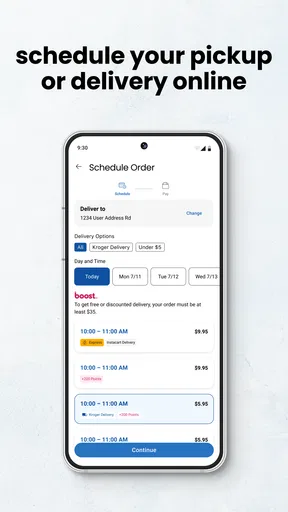
For households choosing between shopping in person and ordering through Kroger’s online options, the app gives access to delivery and curbside pickup as well as in-store planning. I would choose based on the errand, not assume one option is always better: pickup can suit a planned order when a store visit is inconvenient, while walking the aisles gives you direct control over substitutions and produce choices. The right fit can vary with what is on the list and how particular you are about selecting fresh items.
Where it fits among grocery apps
Compared with a general shopping-list app, this one has the advantage of keeping Kroger-related savings and shopping tasks close to the list. The trade-off is that its strongest value depends on actually shopping at Kroger. A standalone list may be better for a household that wants one shared checklist across different supermarkets, while a retailer app is more useful when you want store-specific offers and account rewards in the same routine.
I would also separate the app’s convenience from a promise of lower spending. Coupons and rewards can help with purchases you planned to make, but they can also tempt you to add things simply because they appear discounted. My approach would be to make the list first, then check offers against it. That keeps the app serving the household budget rather than letting promotions set the shopping plan.
One further trade-off is that digital coordination depends on people remembering to keep the list current. The app can make information easier to find, but it cannot tell whether someone has already bought an item elsewhere or whether a family member changed the meal plan. For shared shopping, a quick message about unusual substitutions or last-minute changes still has a place.
In everyday use, I would regard the list as a working plan, not a perfect inventory of the kitchen. Check the pantry and fridge before adding staples, and use the list to communicate what needs replenishing rather than expecting it to know what is at home. That habit limits duplicate buys and makes the list more valuable than simply adding every item you might possibly need.
For shoppers wondering whether they must order groceries to benefit, the app also has value as an in-store companion through its coupons, shopping list, rewards, and store-finding functions. If you only want a list and never use Kroger offers or locations, a simpler tool may involve less account setup. If you do use the chain regularly, keeping these tasks together can make the extra setup worthwhile.
Kroger is a free shopping app from The Kroger Co., with an average rating of 4.4 from around 374,000 ratings and more than 10 million installs. It is rated for Everyone, and version 95.0 requires Android 8.0 or later. It has been available since November 29, 2010, so it is an established option rather than a new experiment; those figures are useful context, though they do not guarantee that every feature will suit a particular household.
The app has also drawn around 61,000 written reviews, which suggests many shoppers have taken the time to share detailed feedback. I would weigh that popularity alongside your own habits: a large audience does not make it the right choice for someone who rarely shops at Kroger, but it does show that the app is used by a substantial number of people.
My household recommendation would be to try it if Kroger is already part of your regular routine, then agree on a clear list-and-account arrangement before multiple people depend on it. It is less suitable as a universal family organizer or as a replacement for comparing several retailers. Used within its natural limits, it can make grocery planning and store-specific savings easier to coordinate without pretending to manage the household for you.
Ever found yourself wandering the grocery aisles, trying to remember if you’ve already got milk in the fridge? Well, let me introduce you to the Kroger app. This little gem is here to revolutionize your shopping experience, whether you’re a meticulous list-maker or a spontaneous basket-filler.
First Impressions
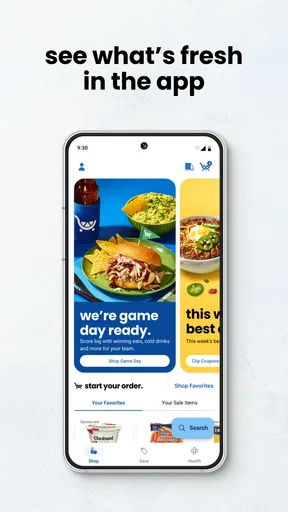
As soon as you launch the app, you’re greeted with a sleek, user-friendly interface. It’s like having your personal grocery assistant right in your pocket. The design is intuitive, making navigation a breeze even if you’re not exactly a tech wizard. Everything from browsing deals to managing your shopping list is just a tap away.
Features that Stand Out
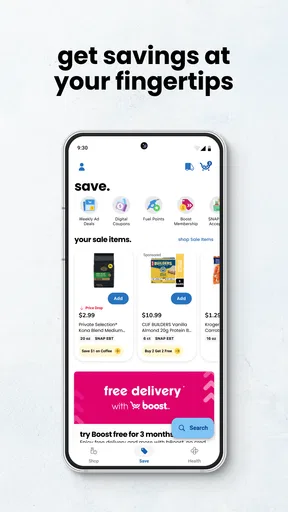
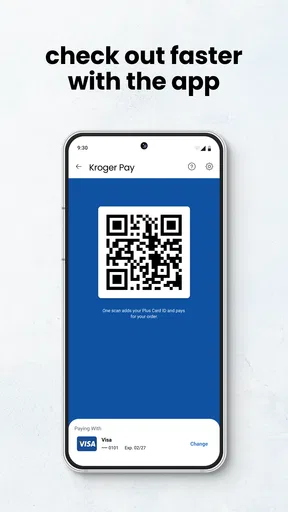
One of the standout features for me is the digital coupons. Gone are the days of clipping paper coupons and forgetting them at home. With just a click, you can add these savings to your account and they’ll automatically apply at checkout. It’s a real game changer for those of us who love to save a buck.
Another feature worth mentioning is the shopping list. You can create, modify, and check off items as you go. The app even suggests items based on your past purchases, which is super handy if you’re like me and tend to buy the same brands over and over.
Seamless Shopping Experience
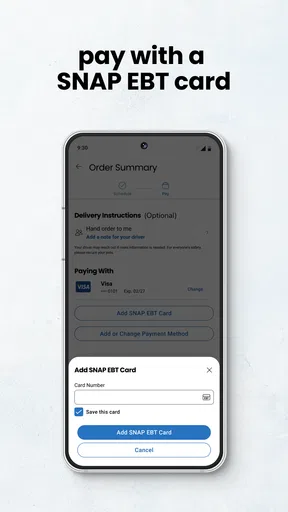
Now, let’s talk about the actual shopping experience. The app offers a seamless integration with Kroger’s online shopping platform. You can choose to have your groceries delivered straight to your door or opt for curbside pickup. Both options are smooth and efficient, saving you time and effort.
The delivery option is a lifesaver for busy weeks when you can’t make it to the store. And if you’re worried about someone else picking your produce, don’t be. The quality is top-notch, almost as if you picked them yourself.
Rewards Galore
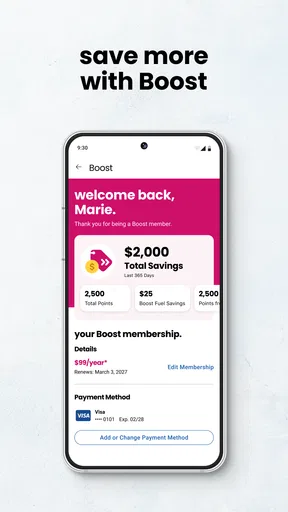
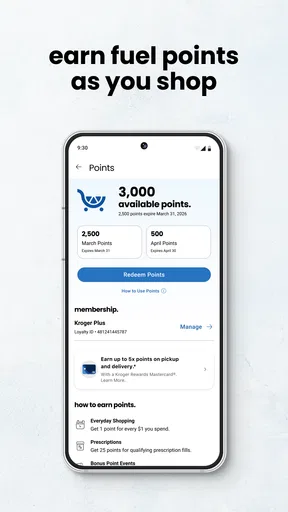
One of the coolest aspects of the app is the rewards program. Every purchase you make earns you points, which you can then redeem for discounts on future purchases. It’s a fantastic way to get a little something back just for doing your regular shopping.
Plus, the app keeps track of your points and rewards, so you’re never left wondering how much you’ve accumulated. It’s all right there, easy to find and use.
Room for Improvement
While the app is pretty fantastic, there’s always room for improvement. Occasionally, the app’s syncing can be a bit slow, especially during peak shopping hours. It’s nothing too major, but worth mentioning if you’re someone who likes everything to be lightning-fast.
Also, the search function could be more intuitive. Sometimes, finding specific items requires a bit more effort than I’d like. But hey, it’s a small price to pay for the convenience the app offers overall.
Final Thoughts
All in all, the app is a must-have for anyone looking to streamline their grocery shopping. It’s packed with features that make the whole process easier and more rewarding. While there are a few minor hiccups, they’re easily overshadowed by the app’s benefits.
Whether you’re a seasoned shopper or someone who dreads the weekly grocery run, this app is bound to make your life a little easier. So, give it a try, and watch as your shopping experience transforms into something enjoyable and efficient.
Pros
- User-friendly interface enhances shopping experience.
- Seamless integration with Kroger's rewards program.
- Easy access to digital coupons and deals.
- Quick and efficient checkout process.
- Personalized product recommendations.
Cons
- Occasionally slow load times during peak hours.
- Limited international availability.
- Requires frequent updates for optimal performance.
- Notifications can sometimes be overwhelming.
- In-app navigation can be unintuitive for new users.
FAQs for Kroger
What features does the Kroger app offer to enhance my shopping experience?
The Kroger app provides a comprehensive shopping experience by allowing users to create shopping lists, find digital coupons, and access weekly ads. It also offers a seamless online ordering system for pickup or delivery, personalized recommendations based on purchase history, and a rewards program to earn and redeem fuel points.
Is my personal information safe when using the Kroger app?
Yes, Kroger prioritizes user security. The app employs robust encryption protocols to protect your personal and payment information. Regular updates and adherence to data protection regulations ensure that your information is secure while using the app for transactions and account management.
Can I use the Kroger app to manage my prescriptions?
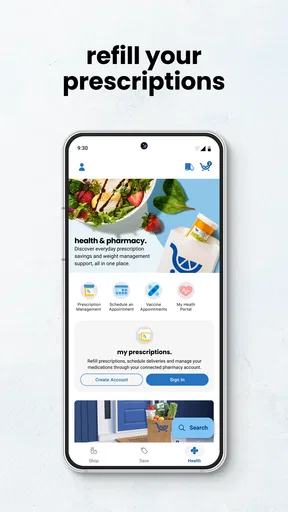
Absolutely. The Kroger app includes a pharmacy section where you can manage prescriptions. Features include refilling prescriptions, setting medication reminders, and accessing pharmacy records. You can also transfer prescriptions from other pharmacies and schedule vaccinations directly through the app.
How does the Kroger app handle digital coupons and promotions?
The Kroger app makes it easy to save with digital coupons and promotions. Users can browse available coupons, clip them directly to their account, and automatically apply them at checkout. The app frequently updates with new deals, allowing you to maximize savings on everyday purchases.
What should I do if I encounter technical issues with the Kroger app?
If you experience technical difficulties with the Kroger app, first ensure that your app is updated to the latest version. If problems persist, contact Kroger’s customer support through the app or website. They offer assistance for troubleshooting, including account issues and app functionality concerns.


